
Holidays are when pet owners need a sitter most — and when you're most in demand. WinniePaws lets you set an optional surcharge that applies automatically on major holiday dates.
Where to set it
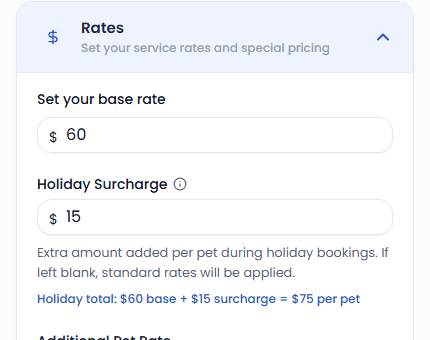
Go to Settings › Services & Rates and enter an amount in the Holiday Surcharge field for each service. Leave it blank and your standard rate applies with no surcharge.
How it's applied
For overnight services (boarding, house sitting), the surcharge applies per night that falls within a holiday window, multiplied by the number of pets. For visit-based services (walks, drop-ins), it applies per visit that falls on a holiday date, also per pet.
If a multi-night stay only partially overlaps a holiday window, only the nights that actually fall within it are surcharged — the rest of the stay bills at your normal rate.
Current holiday dates
May 22–25, 2026
June 19–21, 2026
July 3–5, 2026
September 4–7, 2026
November 26–29, 2026
December 24, 2026 – January 3, 2027
Recurring schedules
Holiday surcharges apply to recurring bookings too, calculated fresh against each individual occurrence as it's billed — so a weekly walk that happens to land on a holiday gets the surcharge that week only.